






Introduction
Salesforce has long been synonymous with its built-in user interface, the familiar Lightning Experience that millions of users log into every day. But a quiet revolution is underway. More and more organizations are decoupling Salesforce’s powerful backend from its front-end presentation layer, building entirely custom experiences while still leveraging Salesforce as the engine underneath.
This is what the industry calls headless Salesforce, and it’s reshaping how teams think about CRM, customer portals, e-commerce, field service, and more.
Whether you’re an admin trying to understand what your dev team is talking about, a developer evaluating architecture options, a consultant advising clients, or an architect designing the next big platform, this article is your plain-English foundation.
Let’s start from the beginning.
What Does “Headless” Actually Mean?
The term “headless” comes from web development. A traditional application has a “head,” which is the visual user interface that users see and interact with. In a headless architecture, the head is removed. The backend (data, logic, business rules) is completely separated from the frontend (what users see).
Communication between the two happens through APIs, usually REST or GraphQL, so the backend doesn’t care what the frontend looks like. It just responds to requests and sends data.
Think of it like a restaurant
In a traditional setup, the kitchen and the dining room are tightly coupled. The chef decides the menu, the plating, and the presentation. Customers eat what’s served, how it’s served.
In a headless model, the kitchen (Salesforce) still does all the hard work: cooking the food, managing recipes, tracking inventory. But the “dining experience” (the UI) can be anything: a food truck, a five-star restaurant, a delivery app, or a vending machine. Each can pull from the same kitchen through a consistent ordering system (the API).
What Is Headless Salesforce, Specifically?
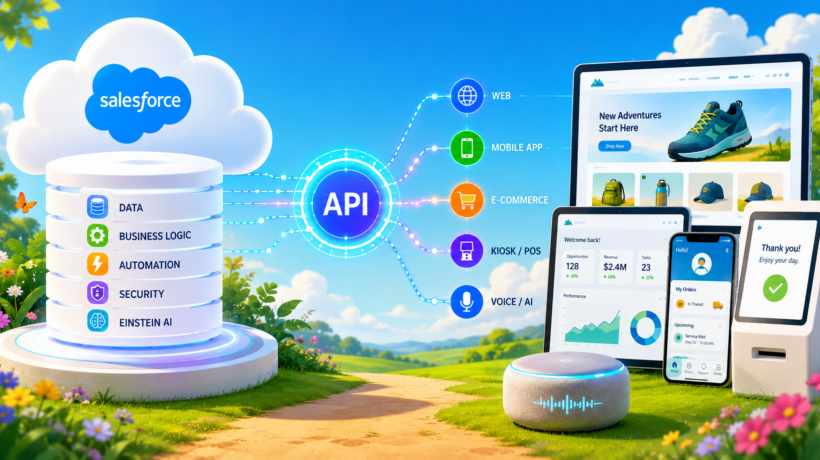
Headless Salesforce means using Salesforce as a backend platform, including its data model, business logic, automation, and security, while building a completely custom front-end experience using technologies like React, Vue.js, Next.js, or a mobile-native framework.
Instead of rendering pages within Salesforce Lightning, the custom frontend calls Salesforce APIs to read and write data, trigger flows, run Apex, or access Einstein AI, and then presents that data in whatever way the business needs.
What Salesforce exposes for headless use:
- Salesforce REST API: Standard CRUD operations on any Salesforce object
- Salesforce GraphQL API: Flexible data querying introduced in recent API versions
- Experience Cloud (Headless): Build custom storefronts or portals that authenticate through Salesforce but render independently
- Headless Commerce (B2B & B2C Commerce Cloud): A dedicated API-first layer for e-commerce that lets developers build storefronts in any tech stack
- Connect API: Used for Chatter, community features, and notifications
- Apex REST: Custom logic exposed as HTTP endpoints
Why Is Headless Salesforce Gaining Traction?
Several converging forces are driving the headless trend:
- Flexibility and brand control. Organizations want their customer-facing experiences to look and feel like them, not like Salesforce. Headless allows complete UI freedom without compromising on Salesforce’s backend power.
- Performance. Custom frontends built with modern JavaScript frameworks (Next.js, Nuxt, SvelteKit) can be optimized in ways the standard Salesforce UI cannot. Server-side rendering, edge caching, and optimized bundles mean dramatically faster load times, which is especially critical for e-commerce conversion rates.
- Omnichannel delivery. The same Salesforce backend can power a website, a mobile app, a smart device, a kiosk, or a voice assistant, all simultaneously. Write the logic once; deliver it everywhere.
- Developer talent and ecosystem Web developers fluent in React or Vue far outnumber those trained in Lightning Web Components. Headless lets companies hire from a broader pool and use the tools their teams already love.
- Composable architecture Modern enterprise architecture is moving toward a “best-of-breed” approach: pick the best CMS, the best search engine, the best checkout experience, and stitch them together. Salesforce fits naturally into this composable stack as the data and logic layer.
- A platform that has genuinely grown to meet the idea It is worth noting that Salesforce APIs have long existed. Developers have been building custom frontends and integrations against them for well over a decade. What has changed is the depth and breadth of what is now exposed. Purpose-built Commerce APIs, a maturing GraphQL API, and most recently Headless 360 represent real platform investments, not just rebranding. With Headless 360, Salesforce formalized the direction by exposing every platform capability, including flows, metadata, and AI agents, through three access patterns: APIs (REST and GraphQL), MCP tools (Model Context Protocol, a standard that lets AI agents consume platform capabilities as tools), and CLI commands. The practical result is that an AI agent, or any external system, can now interact with your entire Salesforce org without a browser ever being in the picture. If you work with AI-powered workflows and agents, the Agentforce Specialist certification is worth exploring.
The Impact by Role:
For Salesforce Administrators
At first glance, headless architecture might seem like it lives entirely in developer territory. But admins are more involved than they think.
What changes:
- The Salesforce UI that admins configure (page layouts, record pages, Lightning App Builder) may no longer be what end users actually see. The “front door” moves to the custom application.
- Admins still own the data model, validation rules, flows, and permissions, and these still govern what the headless app can read, write, and do.
- User profiles, permission sets, and sharing rules remain critical because the APIs respect Salesforce’s security model.
What stays the same:
- Object management, field creation, and relationships
- Automation (Flows, Process Builder), which can still run in the background
- Reports and dashboards (internal users may still use the Salesforce UI)
- Data management and imports
Key takeaway for admins: Your work still powers the experience. The Salesforce backend you configure is exactly what the headless frontend calls. Clean data models and well-structured flows matter more than ever. If you want to solidify your platform fundamentals, the Salesforce Administrator certification is a strong foundation to build on.
For Salesforce Developers
Headless Salesforce represents one of the biggest shifts in how Salesforce development is practiced.
What changes:
- Lightning Web Components (LWC) built for Salesforce pages are no longer the primary front-end pattern. Instead, developers write components in React, Vue, or another framework, calling Salesforce APIs from outside the platform.
- The focus moves from “how do I build this in Lightning?” to “how do I design a clean API contract between Salesforce and my frontend?”
- Apex development evolves; REST endpoints, platform events, and asynchronous processing become critical skills.
New skills to develop:
- Salesforce REST and GraphQL API fluency
- OAuth 2.0 authentication flows, including JWT Bearer, user-agent, and Client Credentials flows, now configured through External Client Apps (ECAs), which replaced Connected Apps as of Spring ’26
- Apex REST services (@RestResource annotations)
- Named Credentials and external identity providers
- Experience Cloud’s headless authentication APIs
- Modern JavaScript and frontend frameworks, areas covered in the JavaScript Developer certification
What stays the same:
- Apex for business logic
- SOQL for data queries
- Salesforce security model enforcement
- Metadata API for deployments
Key takeaway for developers: The opportunity here is significant. Developers who can bridge Salesforce expertise with modern frontend frameworks and API design will be some of the most in-demand professionals in the ecosystem. The Platform Developer I and Platform Developer II certifications are the natural starting points for building that depth.
For Salesforce Consultants
For consultants, headless Salesforce creates both new conversations and new responsibilities.
What changes:
- Discovery sessions must now include questions about the client’s broader technology stack: Do they have a CMS? What frontend framework does their dev team use? Do they need a mobile app?
- Proposals must account for the fact that a headless solution requires frontend development capacity, either within the client’s team or from a partner with web dev skills.
- Scope creep risk increases if the headless “surface” isn’t defined clearly upfront.
New questions to ask clients:
- Do you need your customer experience to be fully branded/custom, or is a standard portal sufficient?
- Who will own the frontend code? Is it internal or outsourced?
- What’s your performance requirement? (Conversions, load time, mobile experience)
- Are you using a composable commerce or CMS platform alongside Salesforce?
New value to deliver:
- Consulting on API-first design and data contract strategy
- Guiding headless Experience Cloud deployments
- Advising on headless B2C or B2B Commerce Cloud implementations
Key takeaway for consultants: Headless is a premium engagement. It typically involves more stakeholders (CTO, frontend teams, UX agencies) and a more complex implementation. Consultants who can navigate both Salesforce and the broader web tech ecosystem will win these projects.
For Salesforce Architects
Architects are at the center of every headless decision. The architectural implications are wide-ranging.
Core architectural considerations:
Authentication & identity. Headless apps authenticate via OAuth 2.0. Architects must choose the right flow: Authorization Code (for user logins), JWT Bearer (for server-to-server), or Client Credentials (for machine-to-machine). Misconfigurations here are the most common source of headless security issues. The Identity and Access Management Architect certification goes deep on exactly this domain.
API design and governance. Every piece of data or logic the frontend needs must be available via an API. Architects must decide: use standard REST, use GraphQL, build custom Apex REST endpoints, or a combination? Each choice has performance, maintainability, and security tradeoffs. The Integration Architect certification covers these decisions in detail.
Data volume and query optimization. GraphQL is particularly powerful here, allowing frontends to request exactly the fields they need, nothing more and nothing less. Architects should design with SOQL query limits and Bulk API use cases in mind from day one. The Data Architect certification is directly relevant here.
Caching strategy. Unlike the Salesforce UI, a headless frontend typically sits behind a CDN or edge network. Architects must plan what data can be cached (product catalogs, static content) versus what must always be live (pricing, inventory, user-specific data).
Integration with composable stack. A headless Salesforce implementation often runs alongside a CMS (Contentful, Sanity), a search engine (Algolia, Elasticsearch), and a CDP (Segment, Salesforce Data Cloud). Architects own the integration map.
Key takeaway for architects: Headless is an API-first commitment. Architecture decisions made early, especially around identity, data contracts, and caching, have long-term consequences. Design for flexibility, but govern the boundaries carefully.
For End Users
End users are the ultimate beneficiaries, though they are also the ones most affected when headless goes wrong.
What gets better:
- Speed: Custom frontends are typically faster than standard Salesforce pages, especially on mobile.
- Usability: A headless UI is built specifically for the user’s workflow, not shaped by Salesforce’s generic page builder. The result is a cleaner, more intuitive experience.
- Brand experience: Customer-facing portals and storefronts feel native to the company’s brand, not like “a Salesforce page.”
- Mobile experience: Apps built headlessly can offer true native or progressive web app (PWA) experiences far beyond what standard Salesforce Mobile provides.
What end users need to know:
- They may not even know they’re using Salesforce. That’s intentional, and it’s a good sign.
- Support paths may change. If something goes wrong with the custom UI, it may require the development team’s involvement rather than a Salesforce admin.
- Internal users (sales reps, service agents) may continue using the standard Salesforce Lightning UI, while external customers interact with the headless layer.
Key takeaway for end users: Headless Salesforce, when done right, is invisible. It just means a better, faster, more tailored experience.
Common Headless Salesforce Use Cases
To make this concrete, here are the scenarios where headless Salesforce most commonly appears:
Headless B2C Commerce. Retailers building high-performance storefronts with Salesforce Commerce Cloud as the backend but a custom React or Next.js frontend. Speed and conversion optimization drive this choice.
Custom Customer Portals. Instead of using Experience Cloud’s standard templates, organizations build pixel-perfect portals with their own frameworks, authenticating users through Salesforce and reading case, account, or order data via API.
Mobile Applications. Native iOS or Android apps that use Salesforce as the CRM and data backend, communicating entirely through APIs rather than a Salesforce-rendered interface.
Partner Portals. Channel partners interact with a custom portal that pulls deal registration, pricing, and marketing assets from Salesforce without seeing the Salesforce UI.
Field Service Applications. Technicians use custom mobile apps for job management that sync with Salesforce Field Service in the background.
How to Get Started
If you’re new to headless Salesforce, here’s a practical starting path:
Step 1: Understand Salesforce’s API capabilities. Start with Trailhead. The “API Basics” and “REST API” modules are foundational. Understand what’s available out of the box before building custom endpoints.
Step 2: Set up an External Client App (ECA). Every headless integration authenticates through an External Client App in Salesforce, which replaced Connected Apps as of Spring ’26. Learn how to configure OAuth scopes, callback URLs, and IP restrictions within an ECA.
Step 3: Make your first API call. Use Postman or Insomnia to authenticate against your Salesforce org and retrieve a simple list of records. Getting data from Salesforce via an API call, entirely outside of any Salesforce page, is the “aha moment” that makes headless concrete.
Step 4: Explore the Headless Commerce or Experience Cloud APIs. If your use case involves commerce or community portals, Salesforce has dedicated headless documentation and starter projects. The Salesforce Composable Storefront (for B2C Commerce) is a great reference implementation.
Step 5: Think about the full stack. Headless doesn’t mean “only Salesforce APIs.” Plan your frontend framework, hosting (Vercel, Netlify, AWS), CDN strategy, and how Salesforce fits within your broader composable architecture.
Step 6: Prototype before you commit. Build a small spike: a single page or feature that calls Salesforce APIs and renders in a custom frontend. This validates your authentication setup, exposes API design issues early, and gives your team a shared reference point.
What Headless Salesforce Is Not
It’s worth naming a few misconceptions:
- It’s not “abandoning Salesforce.” The platform’s data model, automation, security, and AI remain fully in play. You’re enhancing the front door, not replacing the engine.
- It’s not always the right answer. For internal tools, standard Lightning pages are faster to build and maintain. Headless shines for customer-facing, performance-critical, or highly branded experiences.
- It’s not a Salesforce-only concept. Headless architecture is common across SAP, ServiceNow, and many other enterprise platforms. Salesforce is simply following, and leading, the same trend.
Final Thoughts
Headless Salesforce is not a fad. It reflects a deeper shift in how enterprise software is built: APIs as the universal interface, composable components as the building blocks, and user experience as a first-class concern rather than an afterthought.
For every role in the Salesforce ecosystem, the message is the same: the platform you know isn’t going away. It’s becoming more powerful, more flexible, and more foundational. The “head” just gets to be whatever the business needs it to be.